
Crosswind Calculator
⭐⭐⭐⭐⭐
Welcome to the Crosswind Calculator! I created this tool to make crosswind calculations easy and visually clear. Just adjust the sliders or enter the value manually and you’ll instantly see the crosswind component calculated for you, along with a clear situational display.
Used By: Students, Instructors, and Planners Worldwide.
What Is a Crosswind?
A crosswind is wind that affects movement from the side rather than along the direction of travel. When aligned with a runway, wind coming from the side creates a lateral force that can move you off your intended path. This differs from wind blowing directly ahead or behind, which mainly influences speed. Crosswinds require continuous correction to maintain alignment, and their effect increases as the wind becomes more perpendicular to the runway heading. This sideways force is what makes certain wind conditions feel manageable one moment and challenging the next. This is why understanding the actual crosswind component matters more than just knowing wind speed alone.
What Is a Crosswind Formula?
The crosswind formula is used to determine how much of the wind contributes to lateral force across a runway. When wind approaches the runway from an angle rather than straight ahead or behind, only a portion of its speed becomes a crosswind component. The calculation is based on the relationship between wind speed and the difference between wind direction and runway heading. While the math often involves trigonometric functions, this calculator applies the formula automatically and displays the result instantly. Rather than working through this manually, the calculator applies this relationship instantly and shows the result in a clear, usable way. If you want to learn the complete formula of calculation, I have an article on “crosswind calculation Formula“.
What is Crosswind Calculator?
Wind rarely aligns perfectly with your path, and even small angle changes can dramatically alter how much sideways force you’re dealing with. When wind hits a runway at an angle, it becomes harder to figure out how much of that wind is actually pushing you sideways. Most people find wind direction confusing because the angle changes everything. A 20-knot wind from the side has a very different effect than the same wind speed coming from ahead. Estimating these numbers based on feel alone is unreliable and often misleading. This tool removes the guesswork by breaking down the crosswind component in seconds, showing you exactly what conditions you’re dealing with through both clear numbers and an easy-to-understand visual display. This approach removes the need for charts, mental math, or manual tools. If you want to learn the complete process of calculation, this calculator uses, I have an article on “crosswind calculation Process“.
How To Use This Crosswind Calculator?
Using the crosswind calculator is straightforward and takes only a few seconds.
- Enter the runway heading you’re working with
- Add the reported wind direction and wind speed
- Instantly see how much wind is pushing sideways and along your path
Once these values are entered, the calculator instantly breaks the wind down into usable components. If the wind changes or gusts increase, you can adjust the values and see the impact immediately. This makes it easier to understand how much of the wind is pushing sideways and how much is working along your path. If conditions change, you can simply update the values and see the impact immediately.
How Does the Crosswind Calculator Work?
This crosswind calculator works by comparing the reported wind direction with the runway alignment. When wind is not aligned with the runway, the calculator separates its effect into crosswind and headwind or tailwind components. These values are calculated instantly using established methods and displayed clearly. This removes manual steps and reduces the risk of misinterpretation during planning or decision-making. This lets you focus on understanding conditions instead of working through calculations.
When Should You Use a Crosswind Calculator?
Use this wind component calculator whenever wind is reported at an angle to the runway, and you need clarity before making decisions. It’s especially useful when determining whether conditions fall within your comfort level or operational limits. This becomes especially important when wind direction shifts slightly, because even small angle changes can quickly increase the crosswind component. People learning how wind behaves rely on it to understand runway wind effects, while experienced users use it for quick verification when conditions change.
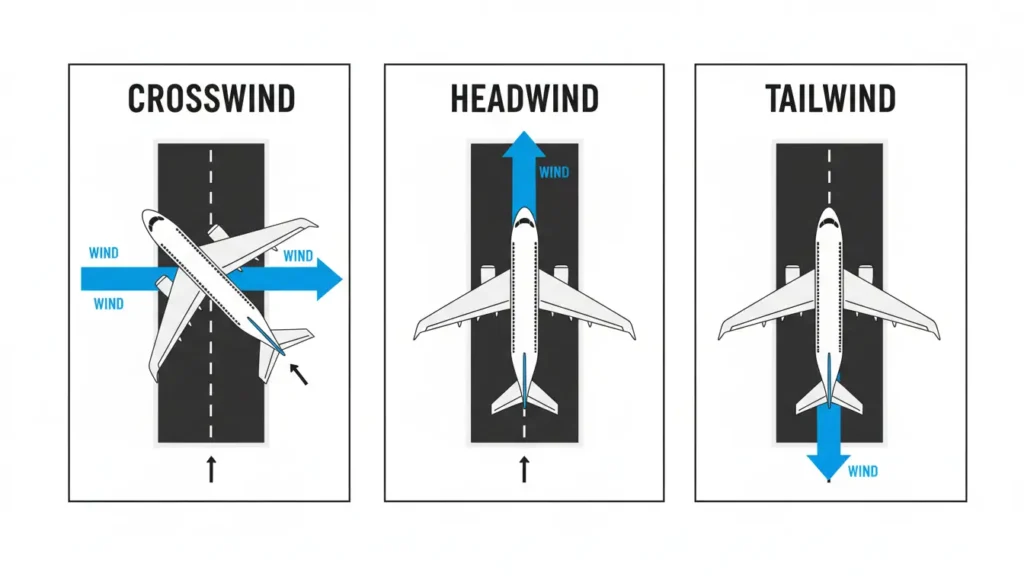
What is difference between Headwind vs Crosswind, vs Tailwind?
These three wind types affect movement in very different ways, and recognizing how each one feels helps you anticipate what to expect.
Headwind: It blows directly toward you, reducing ground speed and generally improving control. It feels steady and predictable.
Tailwind: this wind comes from behind, increasing ground speed while reducing control and requiring more distance to slow down. It often feels faster but less forgiving.
Crosswind: This wind pushes from the side, creating drift that pulls you away from your intended path. It feels like constant sideways pressure and requires ongoing correction. The wind correction angle needed depends on both strength and direction.
Understanding these differences improves awareness and leads to better decisions in changing conditions.
Crosswind Chart vs Calculator
A crosswind chart is a traditional reference tool that shows estimated wind components based on speed and direction. While charts are useful for learning, they rely on manual reading and approximation. A crosswind calculator provides precise results by computing the exact wind component instantly. Instead of interpreting chart values, you enter the conditions directly and receive clear numerical and visual feedback.

What is an E6B in XWind?
An E6B is a manual flight computer traditionally used to calculate wind components, including crosswind and headwind values. While accurate, using an E6B requires multiple steps and careful alignment, which can be time-consuming for beginners.
This crosswind calculator provides the same results instantly without manual tools. It follows the same principles used in E6B calculations but presents the outcome clearly, making it easier to understand and faster to use.
FAQs
Built to clearly explain wind components without charts or guesswork.